
The editor is a development tool. It runs only on my own machine's dev server, a production build contains none of it, and players cannot open it.
What is Street Scene's city made of?
Street Scene is a free night street racer that runs in a browser. There is no map file. Every day's city comes from a number: the date in Pacific time, written as 20261101 for November 1, 2026. That number seeds a chain of generators, one after the other: the road grid, the special districts, the blocks and buildings, the terrain, then the race routes. The physics that drives your car reads the world those generators made and nothing else.
All of it is deterministic. The same date gives the same city, bit for bit, on any machine, because the simulation never reads the clock or calls an unseeded random function, and it does its trigonometry with its own math functions instead of the browser's, whose last digit can differ between engines. That is why a replay is only the seed plus your inputs, 4 bytes per tick, and why a Saturday link opened on a Tuesday rebuilds the Saturday city.
What are the weekend specials?
On Saturdays and Sundays the generator carves a rectangle of 6 to 12 blocks out of the city, deletes the streets inside it and builds one large set piece there. The game has four in rotation: the Rail Yard, the Underground, the Scrapyard and the Port, the newest. The editor was built on the first three, so they are the examples here. Each has a spine, the road the circuit and the sprint must drive from one side of the region to the other, and side lines that part from it and rejoin it: a loading dock with jumps, a low aisle between stacked wrecks, a hump track across the open yard.
Those lines are hand designed in the sense that matters to a driver: where a jump lands, how close a wall stands, whether a crossover lets you change lines. But they are still code: hundreds of numbers in the city's config, run through a module that has to fit whatever rectangle the city gives it on whatever date it lands on.
Why can't you just draw the level?
Because there is nothing to draw on. A hand-drawn layout would fit one rectangle on one day. The next Rail Yard day has different blocks, a different road template (the yard road comes as a z, u, s, sweep or chicane), different ground and a different city around it. So editing means three different things, and the editor keeps them apart.
| Tier | What you do | Holds for | What becomes of it |
|---|---|---|---|
| Tune | Move a config number and watch the real feature regenerate | Every day of that kind | Applied to the config exactly, after it passes on the test days |
| Shape | Drag a corner of the spine on one day | That one day | A sketch of intent, turned into a generator rule. The game never loads it |
| Mark up | Pins, strokes and notes in world coordinates | The design | Read by Claude, with what was at each point |
Before the editor, the loop was: drive the feature, describe what felt wrong in words, change a number, regenerate, drive again. Each round was slow, and words are poor at saying "this corner, about here". Night screenshots did not help, because the game's night scene, built to look good at street level, is hard to judge a layout by from above.
What does the editor show instead?
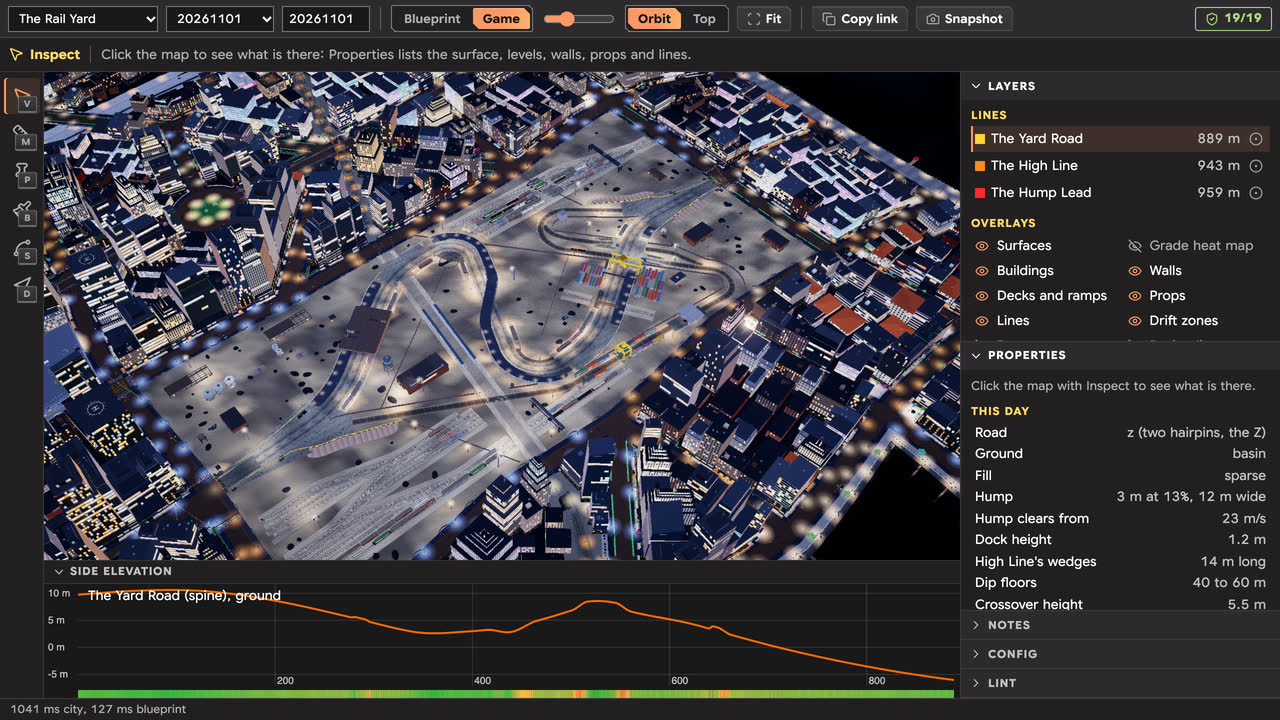
A blueprint. It is built from the same world the physics queries, cropped to the feature, in flat daytime colors per surface, with a hillshade and contour lines every half meter so heights read at a glance. Walls are drawn from the simulation's own collision shapes, so what you see is what a car hits. Under the map, a side elevation plots the selected line's height along its length, with the grade as a color band. The Game button swaps in the real night scene from the same camera, with a boost to exposure and fog so a layout can be judged from the overview.
It is laid out like an image editor: tools on the left (inspect, measure, pin, stroke, shape, drive), an options bar for the active tool, and docked panels on the right for layers, properties, notes, config and lint. Every part of the view is in the URL, so a link opens exactly the same feature, day and camera.
How does live tuning work?
The city's config is one large table of constants. At runtime it is a plain object, so the editor can write a number into it and run the real generators again: a full city and world, which takes 0.5 to 1 second. That runs on the main thread with a busy state, because the world holds functions and cannot be posted to a worker. Nothing in the game writes the config; only the editor's own page and command line process do.
After each change the editor fingerprints the feature, one hash per line, wall type, prop type, surface, deck and height, and says what moved: line:low, walls:yardFence, heights. The editor is built on one rule: a slider that silently does nothing is the worst failure it could have. So a separate check nudges every key either way on up to three days and marks the ones that move nothing, with a reason where it can find one: the value is copied into a constant when the module loads (frozen), only the renderer reads it, it is a measured value kept as documentation, or it only matters past some threshold. On the Rail Yard, the Config panel lists 763 keys and hides the 76 that the check found move nothing.
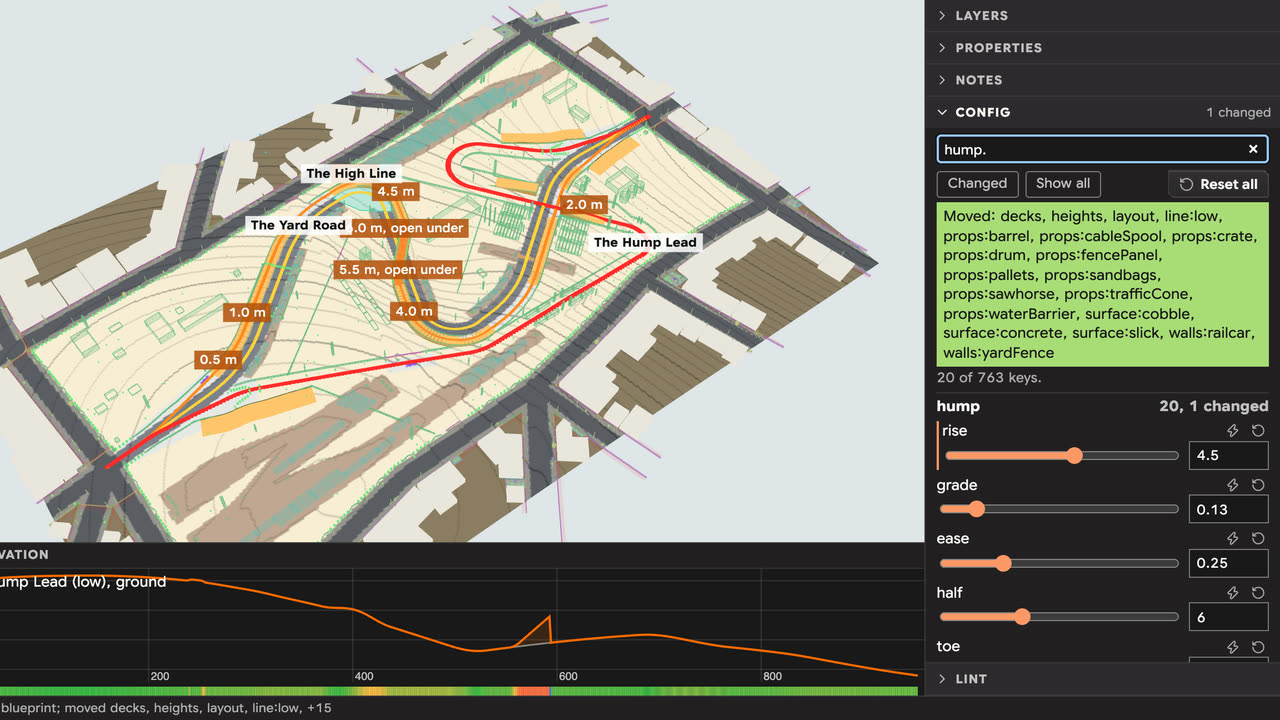
A change that looks right on one day still has to hold on the others. Each feature has lint rules, started from what its test file asserts: the region carves, both routes drive the spine, the side lines part within 55 m of the mouths, no spine node turns more than 32 degrees, every line is clear of walls by half its width. The Rail Yard has 19 of them, and the lint runs them over the kind's test days with the patch applied:
$ npm run feature -- lint railYard --days 6
20261101: pass
20261122: pass
20261213: pass
20270103: pass
20270124: pass
20270214: pass
6 of 6 days pass
The automated tests stay the proof. The lint asks the same questions of a number before it goes into the config.
How do you reshape one day's road?
With the Shape tool you drag an orange corner of the spine, or type its position and radius. The feature's own module lays the road again from the moved corners, and everything downstream follows: the side lines, the decks, the props. In the shot below, moving the roundhouse hairpin 15 m shortened the yard road from 889 m to 876 m and moved the decks, gates and heights with it.
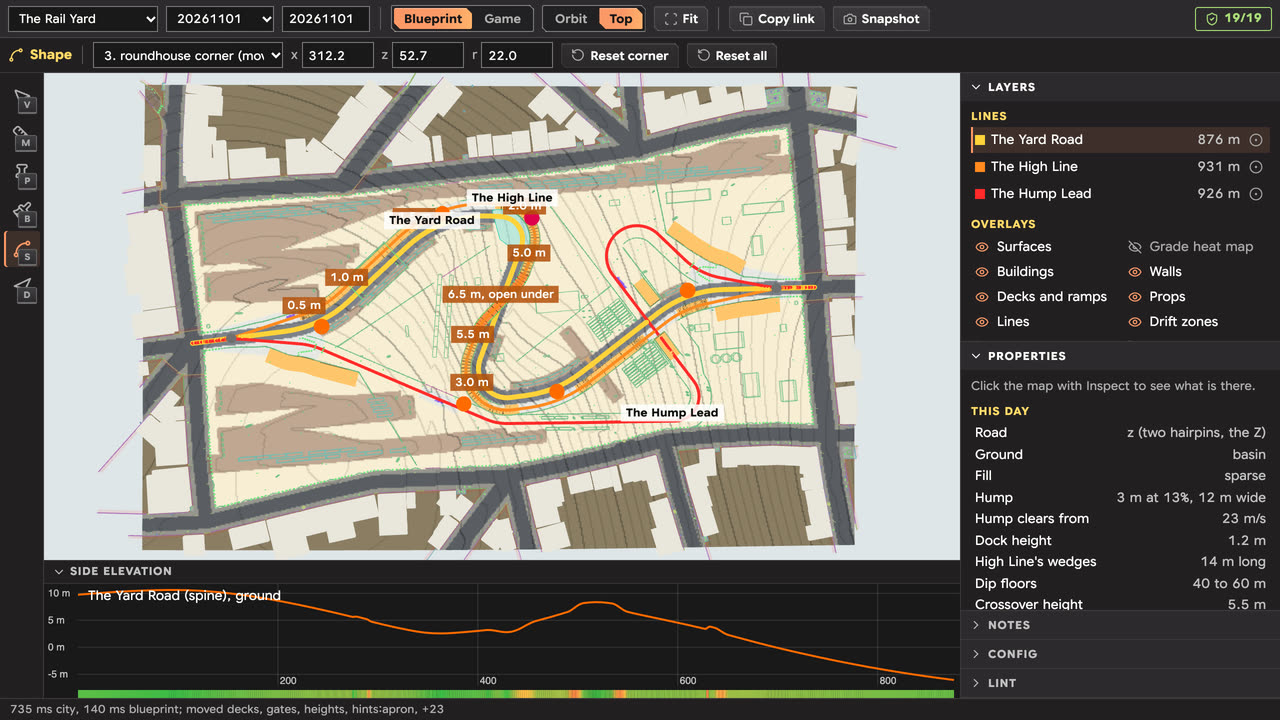
This was the part that touched the game's code most carefully. The edit enters through an optional second argument, createCity(seed, overrides), which the game never passes. Without it the city is bit for bit what it was, which golden hashes of the cities and races prove. The dragged spine is also only for one day: it shows what I want, and the generator rule that produces it on every day is written afterwards.
Many drags are refused, big ones especially. The corners are arcs with little spare room, and the editor says so plainly, then puts the corner back and keeps the last good feature on screen:
Spine refused: the module cannot lay a road through these corners on this region: an arc no longer fits its legs (a corner too close to the next, or a radius too large for its turn), or this day or these numbers carve a different rectangle or different ends than the design was drawn on. Still showing the last good one.
How do notes reach Claude?
I build Street Scene with Claude Code, Anthropic's coding agent, and the editor has two users: me, who needs to see and point at things in 3D, and Claude, which needs to read what I did without a browser. Both go through the same pure modules, so the page and the command line cannot disagree about the city.
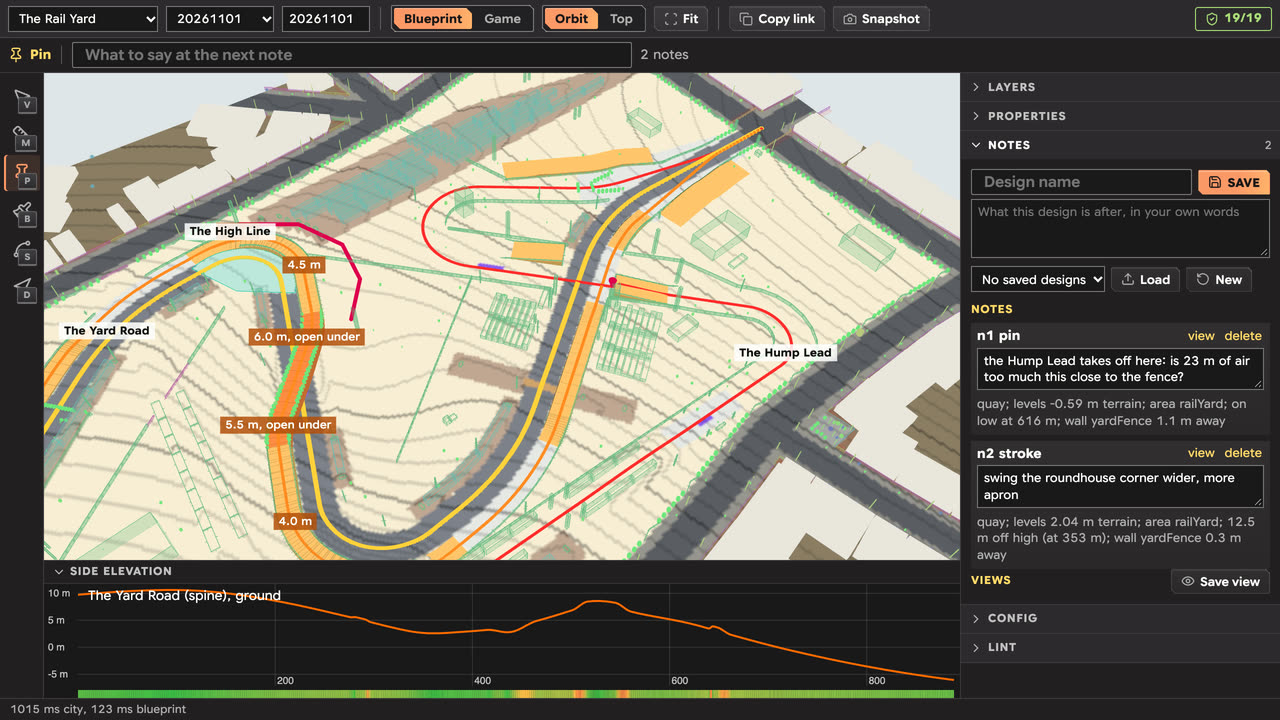
A pin or a stroke keeps its words, its points in world coordinates, the day, the camera it was made from, and a line saying what was there: the surface, every drivable level, the nearest wall, and which line it is on and how far along. Saving writes a JSON design file into the repository, next to any config changes and the dragged spine. Claude reads that file with the report command instead of a screenshot.
The report is the whole feature as text. Here is the start of the Rail Yard's on November 1, 2026:
$ npm run feature -- report railYard 20261101
The Rail Yard (railYard), seed 20261101, generated in 2409 ms
Region: 4 x 2 cells, 16.2 ha

Lines:
  spine "The Yard Road": 889 m, 14 m wide, ground, road, difficulty 1, height -6.0 to 10.6 m
  high "The High Line": 943 m, 7 m wide, deck, road, difficulty 2, height -6.0 to 12.3 m
    leaves the spine 93 m from the entry at (75, 152), rejoins 93 m from the exit at (498, 133)
  low "The Hump Lead": 959 m, 5 m wide, ground, quay, difficulty 3, height -6.0 to 10.9 m
    leaves the spine 84 m from the entry at (69, 173), rejoins 83 m from the exit at (507, 112)
...
Lint:
  pass The region carves and the layout plans: 4 x 2 cells
  pass Every node of the spine turns 32 degrees or less: at most 5.3 degrees
  pass The spine keeps off the region's edge: 25.4 m at the closest
...
The same tool answers questions about a single point (at), lists the design's changes as text to apply to the config (patch), and reruns the no-effect check (effects).
How do test drives work?
The Drive tool puts a car on a line and holds a speed. It is the real simulation, steered by the same pure-pursuit loop the district tests use to drive their lines, and it reports air time, landing speed, pitch and roll rates, wall hits, props and resets, each with where it happened. The path is drawn on the map, blue on the ground and red in the air. Because the sim has no frame rate to wait for, a 40-second drive takes about 130 ms.
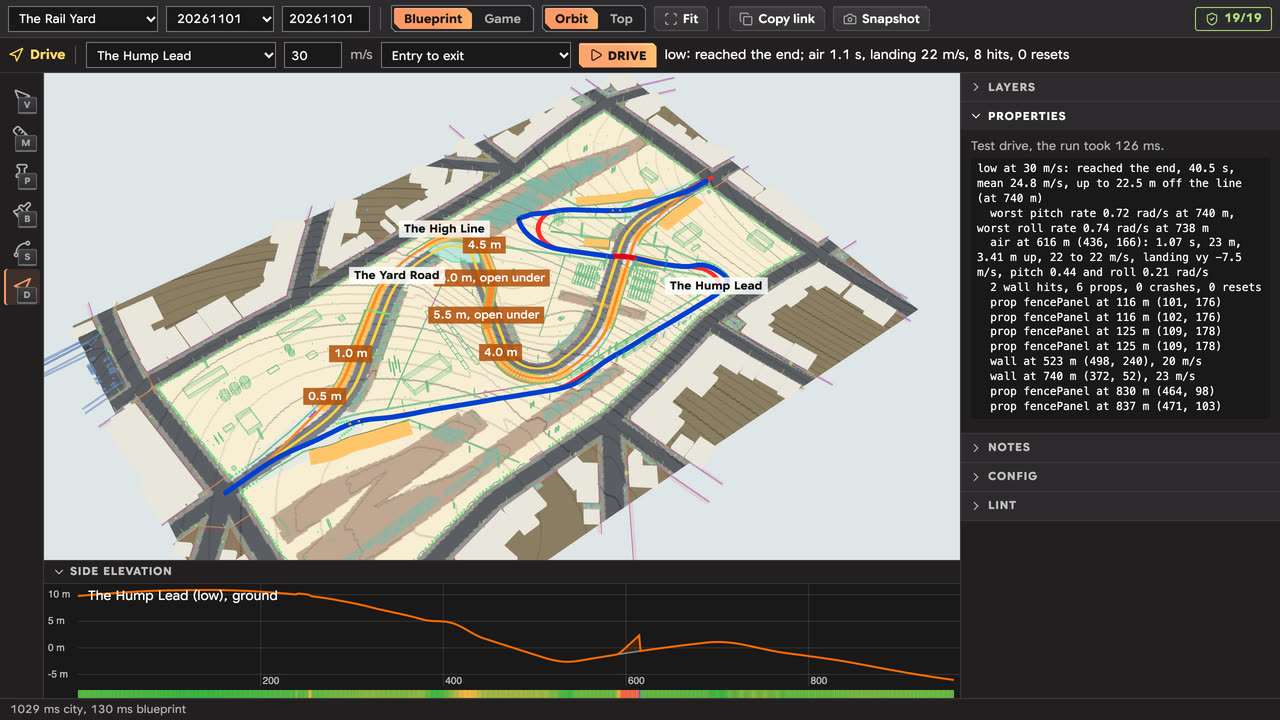
From the command line, the Hump Lead at 30 m/s:
$ npm run feature -- drive railYard 20261101 low 30
low at 30 m/s: reached the end, 40.5 s, mean 24.8 m/s, up to 22.5 m off the line (at 740 m)
  worst pitch rate 0.72 rad/s at 740 m, worst roll rate 0.74 rad/s at 738 m
  air at 616 m (436, 166): 1.07 s, 23 m, 3.41 m up, 22 to 22 m/s, landing vy -7.5 m/s, pitch 0.44 and roll 0.21 rad/s
  2 wall hits, 6 props, 0 crashes, 0 resets
That one jump, a little over a second in the air, is the hump, where the Hump Lead leaps the other two lines about two thirds of the way down. The drive is a check, not a verdict. Whether a jump feels right is still decided by driving it.
What did not work, and what is still missing?
- The first layout was tabs. Look, Tune, Mark up, Ask and Shape each had a tab, which meant switching back and forth to do one thing. Three days later it became the tool-and-panel layout in these screenshots, with every capability kept.
- The night scene hid the layout. The game's fog swallowed a feature seen from overhead, so the Game view needed its own boost, and the blueprint became the default.
- Some sliders cannot move. A few of the Underground's numbers are read once when its module loads. The panel marks them as frozen; making them live means rewriting that module to compute them when used.
- Only the spine has handles. The side lines are offsets of the spine with corners of their own, computed inside each layout. Dragging them needs a second override threaded through every layout.
- You cannot author a feature from a blank region. That would need a module that builds walls, decks and surfaces from data a design holds, and today nothing in the game loads a design at all.
- Every tuned number rewrites history. Because the city is deterministic, a change to a feature's config changes that feature on every past and future day of its kind, along with the replays, ghosts and best times recorded there. That cost is why a number has to pass lint and the tests before it ships.
What does it mean for your weekend races?
Every Saturday and Sunday you get one of the four specials, generated for that date, the same for every player, with a circuit and a sprint that must drive through it. The editor is how a change to those set pieces gets checked across many dates before it ships, rather than on the one day I happened to drive. Each new special also has to have its entry in the editor before its tests pass.
If you want to see what it produces, wait for the weekend, or open the game on any day and race the daily city.
Play Street Scene free Read more about it
Common questions
Can players use the feature editor?
No. It exists only on the development server. A production build contains none of its code, and the game never loads a design file.
Does the editor change the city the game builds?
Not by itself. Without a design, the generator builds exactly the city it always did, which the tests check with hashes. A tuned number reaches the game only after it is copied into the config and passes lint and the tests.
How is a different city generated every day?
The date in Pacific time is the seed. Every generator draws its randomness from that seed, so one date always gives the same streets, districts, routes and weekend special.


